1. Go ahead and force the user profile to close if open or disconnected.
You can do this from two locations.
Close a User Profile via Task Manager
Right-click the taskbar
Click Task Manager.
If Task Manager opens small, click More details.
Click the Users tab.
Find the user/profile you want to close.
Right-click the user name.
Click Sign off.
Click Sign off user to confirm.
Or from the Server management screen here: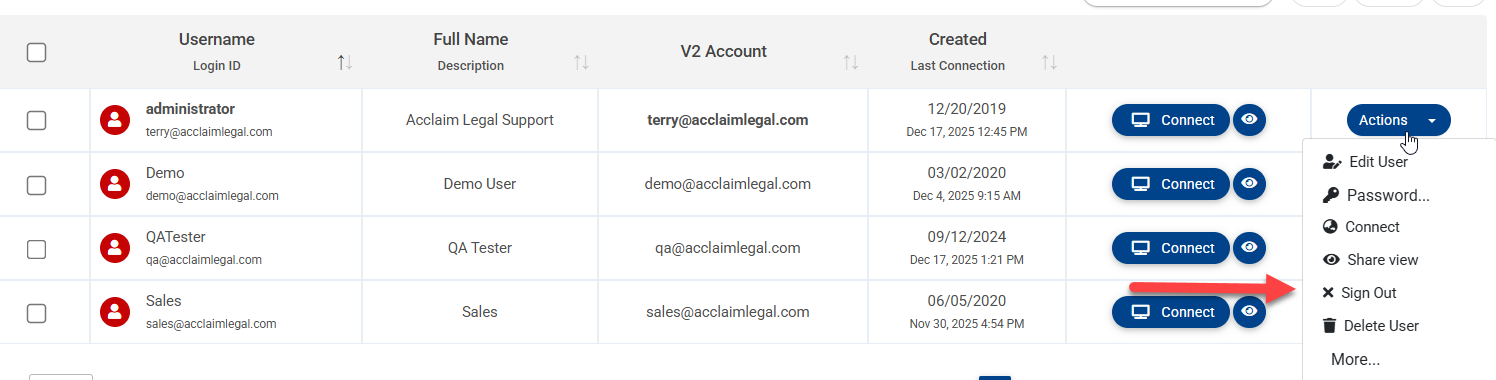
Once complete if the user is still having issues have them clear the cache and history for their browser. Instructions for this depend on the browser but are fairly similar and can be Googled to fit that browser.
Also have them flush the DNS following these steps.
Step 1 — Open Command Prompt
Click Start
Type cmd
Right-click Command Prompt
Click Run as administrator
(If prompted, click Yes)
Step 2 — Run the DNS flush command
In the black window, type exactly:
Press Enter
Step 3 — Confirm success
You should see: flushed the DNS Resolver Cache.Some users will not have permissions to do this step and will need to involve their IT team.
Was this article helpful?
That’s Great!
Thank you for your feedback
Sorry! We couldn't be helpful
Thank you for your feedback
Feedback sent
We appreciate your effort and will try to fix the article